Judge and Witness: The Power of Expression in Your Design Workflow
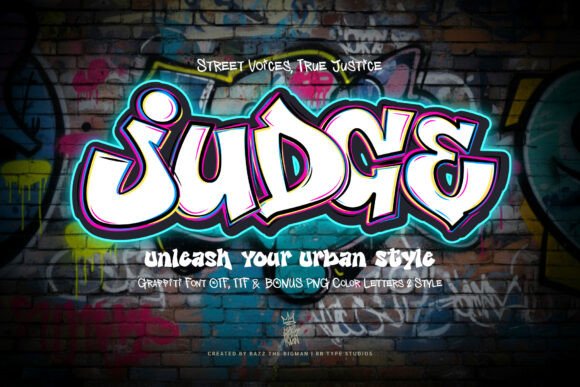
In the landscape of digital typography, finding a typeface that bridges the gap between raw energy and professional application is a strategic advantage. Judge is a dynamic graffiti-inspired typeface designed to intersect the world of street art and urban aesthetics with the rigor of modern design. While many fonts offer style, Judge offers a specific voice—one imbued with an audacious essence associated with streetwear culture, sport-themed designs, album artwork, and poster creations. It encapsulates the boundary-pushing spirit of graffiti, married with the perennial appeal for justice. When you utilize Judge, you are not merely selecting a font; you are adopting a persona. Every word penned in this font resonates with boldness and personality, crafting a narrative that is audaciously stylish and packed with charisma.
Understanding the Strategic Value of Judge
For the modern creator, entrepreneur, or marketer, typography is a functional tool as much as an aesthetic one. The decision to use a font like Judge should occur early in the creative process, specifically during the conceptualization phase. This typeface is not designed for body text or long-form readability; rather, it serves as a focal point. Its utility lies in its ability to immediately establish tone. If you are designing for a demographic that values authenticity, edge, or counter-culture, Judge provides that visual shorthand without requiring extensive explanatory text.
Consider the workflow of a small business owner launching a limited-edition sneaker drop. The pre-production phase involves mood boarding and asset selection. Introducing Judge at this stage influences the subsequent color palette, photography style, and copywriting voice. It dictates a specific "vibe" that ensures consistency across the entire campaign. By anchoring the project in a typeface with such strong character, you streamline decision-making for all other design elements. You are no longer searching for a generic aesthetic; you are building a world around the boldness of the font.
Technical Implementation and PUA Encoding
A common bottleneck in creative workflows is the friction between artistic vision and technical execution. Judge is engineered to minimize this friction through its technical architecture. A critical feature for professionals is that Judge is PUA-encoded. This stands for Private Use Areas in Unicode, a technical specification that ensures all glyphs, swashes, and alternate characters are accessible even in software that does not support OpenType features natively.
For the practical implementation, this means you can access the full range of Judge’s artistic flair whether you are working in Adobe Illustrator, Photoshop, or even basic text editors and web platforms. This interoperability is vital for freelancers who may need to hand off files to clients who lack high-end design software. The PUA encoding acts as a bridge, ensuring that the custom ligatures and stylistic alternates render correctly on any system. This guarantees that the "effortless access" promised by the font is a reality in your daily operations, saving time usually spent converting text to outlines or troubleshooting missing glyphs.
Integration into Specific Projects
The versatility of Judge allows it to be deployed across various stages of a project lifecycle. It is particularly effective in the "output" phase of content creation, such as album artwork or poster designs. However, its use is equally valuable in the "planning" phase for branding workshops.
- Streetwear and Merchandise: Use Judge for logo lockups or taglines. Its gritty texture translates well to embroidery and screen printing, requiring less distortion to look authentic than a clean sans-serif.
- Digital Marketing: In social media workflows, attention spans are short. Judge commands immediate attention on thumbnails and headers. Use it to create high-impact hero images that stop the scroll.
- Event Branding: For music festivals or urban sports events, Judge serves as the primary display typeface. It sets the expectations for the event's energy level before a single ticket is purchased.
Compatibility and Efficiency in Execution
Efficiency in design is often about reducing the number of assets required to achieve a desired effect. Because Judge carries such a heavy atmospheric weight, it often negates the need for complex background elements or heavy filters. A solid color background with a striking Judge headline can be more effective than a cluttered composition. This simplifies the design stack, making the project faster to complete and easier to animate for motion graphics.
When integrating Judge into a broader brand identity, it is essential to establish a hierarchy. Judge should be reserved for high-impact moments—headers, call-to-action buttons, and logos. It interacts best with a neutral, highly legible companion typeface for body copy. This contrast creates a visual rhythm that guides the user’s eye. By pairing the expressive nature of Judge with a clean sans-serif or serif, you maintain the professionalism of the document while injecting the necessary personality.
Long-Term Use and Quality Control
Quality control in typography involves ensuring that the font renders correctly across different mediums. For Judge, this means testing how its bold strokes and graffiti-inspired edges hold up at small sizes. In a practical workflow, you should always test the font in its intended environment early. If the project is a large-scale banner, the intricate details of Judge will shine. If the project is a mobile app icon, you may need to utilize specific stylistic sets or clean alternates provided within the font family to ensure legibility.
Furthermore, the PUA encoding facilitates long-term maintenance. If you update a website or migrate a brand asset library, the characters in Judge remain stable. You do not need to worry about encoding conflicts breaking the visual layout. This technical resilience makes it a sustainable choice for long-term branding, ensuring that the "audaciously stylish" narrative you build today remains intact years down the line.
Practical Workflow Examples
To illustrate how Judge fits into a real-world process, consider the workflow of an educator creating a curriculum for urban history or a blogger focusing on street culture. The content is serious, but the delivery needs to engage a younger, visually literate audience.
- Asset Preparation: The creator selects Judge for presentation headers. Because the font is PUA-encoded, they can quickly copy-paste specific decorative glyphs from a character map into their slide deck or blog editor without needing specialized plugins.
- Content Structuring: The creator uses Judge to denote section breaks. This visual punctuation helps readers navigate the text, using the font's inherent "justice" aesthetic to signal shifts in topic or argument.
- Feedback and Revision: During the review phase, the bold nature of Judge makes layout imbalances immediately obvious. It forces the designer to provide adequate white space, improving the overall composition of the page.
By treating Judge not just as a decoration but as a structural element, the creator enhances the user experience. The font becomes a tool for information architecture, guiding the audience through the content with visual cues that are both stylish and functional.
Observations on Aesthetic Versatility
While Judge is rooted in graffiti, its application is not limited to purely "edgy" projects. In the hands of a skilled designer, it can be used to create contrast in high-fashion contexts or to add a touch of humanity to sterile corporate presentations. The key is context. When placed against a backdrop of minimalist design, Judge acts as a disruptor—a moment of visual rebellion that highlights a specific message. This ability to adapt to its surroundings while maintaining its core identity is what makes it a powerful asset in a creative toolkit.
Ultimately, Judge is about expression. It allows professionals, hobbyists, and entrepreneurs to infuse their work with a distinct voice that refuses to be ignored. By understanding its technical capabilities—like PUA encoding—and integrating it thoughtfully into your workflow, you ensure that every project you undertake is not just seen, but felt. It is a tool for those who wish to make a statement, delivering a message that is as bold as it is clear.