Stanley Elliott: Add a Classy, Natural Touch to Your Designs
In a world saturated with crisp, digital perfection, there's a growing appreciation for the authentic, the personal, and the human touch. This is especially true in design, where a generic font can make a brand feel distant. For those looking to infuse their projects with warmth, elegance, and a sense of genuine craftsmanship, the Stanley Elliott organic signature font offers a beautifully simple solution. It's more than just a typeface; it's a tool for adding a layer of sophistication that feels both intentional and effortlessly natural.
What Exactly is the Stanley Elliott Font?
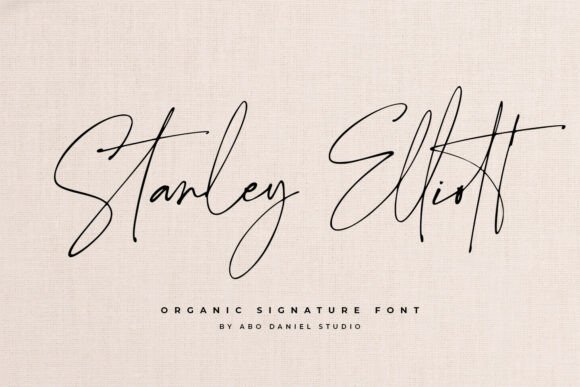
At its core, Stanley Elliott is a digital font meticulously designed to replicate the fluidity and character of a real, handwritten signature. Unlike standard script fonts that can often look rigid or overly uniform, this typeface captures the subtle imperfections and graceful flow of natural penmanship. The creator has focused on creating smooth, flowing lines and unique character forms that make the text look impressively organic, even when typed out on a keyboard.
The key to its realism lies in its extensive set of 252 easy-to-access ligatures. In typography, a ligature is a character that combines two or more letters into a single, more elegant form. Think of how the letters 'f' and 'i' connect in cursive. Stanley Elliott uses these ligatures intelligently, automatically linking characters in varied and natural ways as you type. This prevents the repetitive, mechanical look common in many digital scripts and is what gives the font its remarkable, authentic appearance with minimal effort from the user.
The Practical Appeal: Why Choose a Signature Font?
The primary goal of using a font like Stanley Elliott is to add a personal, high-end feel to any project. It solves a common design challenge: how to make digital communications and branding materials feel more human and relatable. For entrepreneurs, freelancers, and small business owners, this can be invaluable. It helps build a brand identity that feels trustworthy and approachable, setting it apart from competitors who rely on overused, standard fonts.
For creatives and hobbyists, the appeal is in its versatility and aesthetic charm. It provides an easy way to achieve a polished, professional look without needing advanced calligraphy skills or the time to hand-letter every design. It bridges the gap between the desire for a custom, handmade look and the efficiency required for modern digital workflows. Whether you're designing a logo or a simple thank-you note, Stanley Elliott provides a foundation of elegance.
Where and How to Use Stanley Elliott
The true strength of Stanley Elliott is its adaptability across a wide range of applications. Its classic, signature style makes it suitable for both personal and professional projects, adding a touch of class wherever it's used.
Branding and Business Materials
For a business, first impressions are everything. Stanley Elliott can be a cornerstone of a sophisticated brand identity. Consider using it for:
- Logos and Wordmarks: It can create a memorable and personal brand mark for businesses in fashion, beauty, consulting, photography, or artisanal goods.
- Business Cards: Using it for a name or tagline on a business card immediately adds a distinguished, personal touch.
- Social Media Graphics: Elevate quotes, announcements, or promotional images with a font that feels authentic and engaging.
- Website Headers: A stylish headline in Stanley Elliott can draw visitors in and establish a brand's tone of voice from the first glance.
Personal and Event Stationery
Some of the most beautiful applications for this font are in personal and celebratory designs. It brings a heartfelt quality to stationery that is hard to achieve with standard fonts.
- Wedding Invitations: Its elegant, flowing script is a perfect choice for wedding invitations, save-the-dates, and other event stationery, lending a romantic and timeless feel.
- Greeting Cards and Postcards: Make any message feel more special and personal by setting it in a font that mimics a handwritten note.
- Digital Signatures: Create a polished and consistent email signature that stands out and reinforces your personal brand.
Creative and Educational Projects
Beyond commercial and personal use, Stanley Elliott is a fantastic resource for a variety of other creative endeavors. Teachers can use it to create engaging materials, while bloggers and content creators can use it to add visual interest to their work. It’s also perfect for crafting personalized gifts, creating unique art prints, or designing custom apparel mockups.
Key Considerations Before You Start
While Stanley Elliott is user-friendly, a few practical points are worth considering to get the best results. First, like most signature fonts, it is designed for display purposes, such as headlines, logos, and short phrases. It is not intended for long-form body text, as its intricate style can reduce readability at smaller sizes. Always pair it with a clean, simple sans-serif or serif font for paragraphs to ensure your content is easy to read.
Second, while the 252 ligatures are designed to work automatically, you may want to explore them. Some font files include alternate characters that can be accessed through design software like Adobe Illustrator or Photoshop, allowing for even more customization. Finally, always ensure you have the correct license for your intended use, whether it's for a personal project or a commercial client.
In conclusion, Stanley Elliott is a thoughtfully crafted tool for anyone looking to add a layer of authentic elegance to their designs. It masterfully balances the beauty of natural handwriting with the convenience of a digital font, making it an excellent choice for creating memorable branding, beautiful invitations, and polished professional materials. By choosing this font, you're not just selecting a typeface; you're embracing a style that communicates care, quality, and a personal connection.