Swirl Clipart: Elevate Designs with Elegant Dingbat Fonts
When you look at a finished design—be it a wedding invitation, a business card, or a social media graphic—there is often a subtle element that ties the whole composition together. It might be a delicate line separating the header from the body text, or an intricate corner accent that frames the content perfectly. These details are not accidental; they are the result of using specific tools designed to add polish. One of the most efficient and versatile tools for achieving this level of refinement is the use of Swirl Clipart, specifically packaged as a dingbat font.
Understanding the Nature of Swirl Clipart
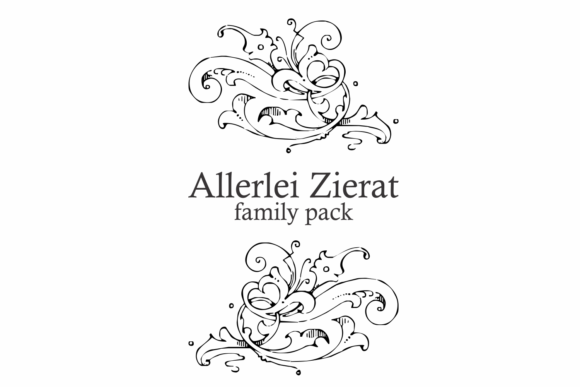
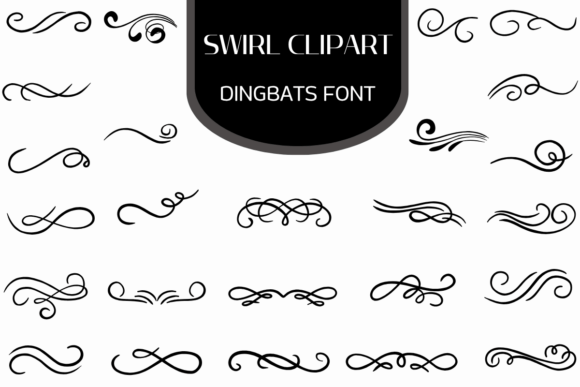
At its core, swirl clipart refers to ornamental vector graphics featuring curves, flourishes, and spiral designs. However, when this artwork is converted into a dingbat font, it changes how creators interact with these assets. Instead of browsing through a folder of image files, you are essentially typing. By pressing a key on your keyboard while using the Swirl Clipart Dingbats font, you place a high-quality vector glyph onto your canvas.
This approach offers a distinct workflow advantage. Because the assets are font-based, they behave like text. This means they are infinitely scalable. Whether you need a tiny accent for a business card or a massive header decoration for a banner, the lines remain crisp and clean. There is no pixelation, regardless of how much you zoom in or enlarge the image. For professionals who require precision, this scalability is a non-negotiable feature.
Practical Applications for Modern Creators
The utility of swirl clipart extends across a vast spectrum of industries and hobbies. It is not merely for "fancy" designs; it is a structural tool that helps organize information and guide the viewer's eye.
Stationery and Invitation Design
For graphic designers specializing in weddings or events, swirl clipart is essential. It allows for the creation of custom monograms and sophisticated borders without drawing from scratch. You can easily create corner brackets for a save-the-date card or a decorative divider between the event details and the RSVP information. Because the swirls are vector-based, they print beautifully on textured paper stock where high-resolution imagery is critical.
Branding and Corporate Identity
Small business owners often struggle to convey a sense of established elegance. Using swirl clipart can bridge this gap. A subtle flourish under a logo or a decorative frame around a quote on a brochure can soften a corporate identity and make it feel more approachable. It adds a layer of visual interest that suggests attention to detail, which can positively influence how customers perceive the quality of your services.
Digital Publishing and Blogging
Content creators and bloggers can use swirl clipart to improve the readability of their articles. Long blocks of text can be intimidating. By inserting a decorative divider—perhaps a horizontal swirl flourish—between different sections of a blog post, you provide a visual break for the reader. This improves the user experience, keeps readers on the page longer, and adds a professional aesthetic that distinguishes your site from standard templates.
Why a Font Format Matters for Efficiency
One of the most significant benefits of using a Swirl Clipart Dingbats font is the efficiency it introduces to the design process. Traditional clipart often involves importing an image, resizing it, and sometimes converting it to match your color scheme.
With a dingbat font, the process is streamlined:
- Color Matching: You can change the color of the swirl simply by highlighting the character and selecting a new font color, exactly as you would with a sentence.
- Compatibility: These fonts work across almost all design software, from Adobe Illustrator and Photoshop to Microsoft Word and Canva. If the software supports text, it supports the clipart.
- File Management: Instead of managing hundreds of loose vector files, you have a single font file installed on your system.
This compatibility makes it an excellent resource for educators creating worksheets or freelancers working with clients who may not have access to high-end design software. It democratizes the ability to create polished, professional-looking documents.
Creative Problem Solving with Vectors
Design often involves solving spatial problems. You might have a layout that feels "top-heavy" or a page that looks too empty. Swirl clipart provides a flexible solution. Because the elements are abstract, they can be rotated, flipped, and scaled to fill negative space effectively.
For example, if you are designing a certificate, the text might be centered, leaving the corners feeling bare. Adding a symmetrical swirl design to the corners anchors the layout. Similarly, if you are creating a menu, swirls can be used to visually separate appetizers from entrees, creating a natural flow for the reader to follow.
Customization and Adaptability
While the original swirl clipart comes in a standard format, its vector nature allows for extensive customization in advanced software like Adobe Illustrator. You can ungroup the vector paths, alter the thickness of the lines, or combine multiple swirls to create a unique crest. However, for the majority of users, the ability to simply type the character and adjust the size and color provides more than enough creative control.
Who Benefits Most from This Resource?
While almost anyone creating visual content can find a use for swirl clipart, certain groups find it particularly indispensable:
- Scrapbookers and Crafters: Those who use cutting machines (like Cricut or Silhouette) can utilize dingbat fonts to create cut files for vinyl or paper projects.
- Print-on-Demand Sellers: Entrepreneurs designing t-shirts, mugs, and posters often need decorative elements that scale well for different product sizes. Swirl clipart ensures the design looks sharp on a small mug and a large poster alike.
- Resume and CV Designers: In a competitive job market, a subtle decorative element can make a resume stand out. Using a swirl as a header divider adds a touch of personality without sacrificing professionalism.
Considerations When Choosing Swirl Clipart
While the benefits are clear, it is helpful to consider the specific style of the swirls you choose. Swirl designs range from very modern, abstract curves to highly ornate, Victorian-style flourishes. Before downloading or purchasing, ensure the aesthetic matches the tone of your project. A heavy, baroque swirl might look out of place on a minimalist tech startup's website, while a thin, geometric swirl might lack the warmth needed for a vintage invitation.
Additionally, while vector scalability is a major advantage, users working with very small text sizes should ensure the swirls they select are legible at those dimensions. Highly intricate swirls can sometimes lose their visual impact when reduced to very small sizes.
Conclusion
In the world of design, details matter. The Swirl Clipart dingbat font is more than just a collection of pretty pictures; it is a functional, efficient, and scalable toolset for enhancing visual communication. By treating decorative elements as typography, it simplifies the design process, ensures high-quality output, and empowers creators to add a professional touch to any project. Whether you are refining a corporate brand or personalizing a family keepsake, these vector flourishes offer a timeless way to elevate your work.