Star Sparkle Font: A Practical Guide to Using Celestial Dingbats in Your Designs
When searching for that perfect decorative element to elevate a design project, typography often holds the key. While standard serif and sans-serif fonts handle the heavy lifting of legibility, dingbats fonts offer a specialized solution for adding flair without relying on complex vector software. Among the myriad of options available, Star Sparkle has carved out a distinct niche as a celestial-themed dingbats font. This article explores the characteristics of Star Sparkle, evaluates its practical applications, and compares it against alternative design resources to help you determine if it is the right tool for your creative workflow.
Understanding the Nature of Dingbats Fonts
Before evaluating Star Sparkle specifically, it is helpful to understand the category it belongs to. Dingbats are essentially fonts that contain symbols, shapes, and illustrations rather than alphanumeric characters. When you type a letter using a dingbats font, a graphic appears instead of a text character. This method of design is particularly useful for users who are comfortable with word processors or basic design software but may not have access to or expertise in advanced graphic design suites.
The primary advantage of this format is versatility. Because the symbols are contained within a font file, they are vector-based by nature. This means they can be scaled to virtually any size—from a small accent on a business card to a large centerpiece on a poster—without losing image quality. Star Sparkle utilizes this technology to offer a collection of celestial shapes, stars, and sparkles that can be integrated into text lines or used as standalone design elements.
What Makes Star Sparkle Distinct?
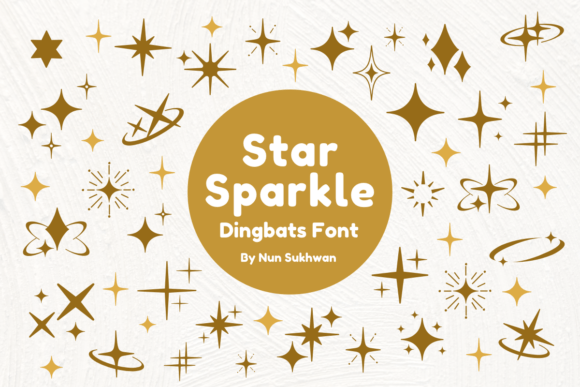
Star Sparkle is defined by its specific aesthetic focus on celestial themes. Unlike general-purpose symbol fonts that might offer a chaotic mix of arrows, buildings, and objects, Star Sparkle maintains a cohesive visual language centered around light and space. The font typically features a variety of star bursts, twinkling effects, and geometric celestial bodies.
The distinctiveness of Star Sparkle lies in its stylistic consistency. The shapes are designed to work harmoniously together. For instance, a user can mix different star shapes from the font family to create a "starry night" effect on a background without the elements looking mismatched or jarring. This cohesion is vital for professional-looking results, particularly in stationery and branding where visual harmony is paramount.
Furthermore, the font often includes variations in weight and complexity. Some characters might represent simple, minimalist stars suitable for modern designs, while others might offer more ornate, sparkling flourishes suitable for formal invitations. This range allows the single font to cover multiple stylistic needs within a specific theme.
Practical Applications and Use Cases
The utility of Star Sparkle extends across several creative domains. Its design makes it particularly well-suited for projects that require a touch of whimsy, elegance, or celebration.
Wedding and Event Stationery
One of the most common applications for celestial fonts is in wedding invitations. The "starry" theme is a popular choice for evening receptions, celestial-themed weddings, or modern minimalist designs. Using Star Sparkle allows designers to add decorative borders, dividers, or corner accents without needing to purchase separate graphic packs. Because the font integrates directly into the text layout, aligning these accents with the typography is often simpler than manipulating external image files.
DIY Crafts and Decorations
For hobbyists and DIY enthusiasts, Star Sparkle offers a low-barrier entry into graphic design. If you are creating party decorations, scrapbooking elements, or custom stickers, a dingbats font is often the most efficient resource. You can type the shapes directly into a document, print them out, and cut them. This workflow is significantly faster than searching for royalty-free images online, downloading them, and resizing them for every project.
Logo Design and Branding
While a dingbats font rarely serves as the primary typeface for a logo, it can serve as an excellent source of inspiration or supplementary iconography. A business related to astronomy, sleep products, or magic might use a symbol from Star Sparkle as a standalone icon or a logomark. However, it is important to note that for professional branding, the vector shape usually needs to be converted to outlines or curves in a program like Adobe Illustrator to ensure it is not dependent on the font file installation.
Comparing Star Sparkle with Alternatives
When deciding whether to use Star Sparkle, it is useful to compare it against other methods of obtaining celestial graphics. The main competitors are not necessarily other dingbats fonts, but rather different formats of digital assets.
Dingbats vs. Vector Packs (SVG/EPS)
The most common alternative to a font like Star Sparkle is a vector pack containing individual SVG or EPS files. These are collections of graphics sold or distributed as separate files.
- Organization: With a vector pack, you browse a folder of thumbnails to find the right shape. With Star Sparkle, you often have to memorize which keys on your keyboard correspond to which stars, or refer to a "key map" provided by the designer.
- Flexibility: Vector packs usually offer more complex, multi-colored designs. A dingbats font is typically a single color (the font color), though advanced users can use gradient fills on text.
- Compatibility: Fonts are generally easier to install on operating systems and use across different software (Word, Pages, Photoshop) compared to vector files, which require specific design software to edit.
Dingbats vs. Stock Photography and PNGs
Another alternative is using raster images (PNGs/JPGs) with transparent backgrounds.
- Scalability: This is where Star Sparkle wins. Raster images pixelate when enlarged. If you are printing a large banner, the font will remain crisp, whereas a PNG star might become blurry.
- File Management: Managing one font file is generally easier than managing hundreds of individual PNG files, which can clutter a hard drive and slow down design software.
Evaluating Strengths and Tradeoffs
Like any design resource, Star Sparkle presents a set of pros and cons that should be weighed against your specific project requirements.
Strengths
- Consistency: The design language is uniform. You don't have to worry about line weights clashing because the font was designed as a cohesive family.
- Ease of Use: For non-designers, typing a character is much more intuitive than learning how to use the pen tool or clipping masks.
- Cost-Effectiveness: Dingbats fonts are often very affordable or free for personal use, making them a budget-friendly option compared to hiring a graphic designer or buying premium asset packs.
Tradeoffs and Limitations
- Character Limits: Fonts have a limited number of character slots. A font can only contain a finite number of symbols. If you need 500 variations of stars, a font might not be able to hold them all, whereas a folder of vector files can be infinite.
- Customization: While you can change the color and size of the Star Sparkle symbols, you cannot easily edit the shape of the vector points unless you convert the text to outlines in a vector editor. If you want to slightly alter the tail of a comet or the point of a star, it requires extra steps.
- Searchability: You cannot "search" for a specific symbol within a document the way you can search for text. If you use a Star Sparkle symbol in a long document, it may be difficult to locate it later without scrolling.
Decision Factors: When to Choose Star Sparkle
Making the right choice depends on your workflow, your technical skills, and the nature of your project. You should consider Star Sparkle as a strong candidate if:
- You are working primarily in text-based software: If your main tools are Microsoft Word, Google Docs, or Apple Pages, a font is the most reliable way to add high-quality graphics. These programs handle fonts much better than they handle complex vector imports.
- You need rapid iteration: If you are designing invitations and need to quickly swap out different star styles to see which looks best, changing a font character is faster than deleting an image and importing a new one.
- You value aesthetic cohesion: If you want a set of stars that look like they belong together, the curated nature of the font ensures this automatically.
However, you might need a different option if:
- You require complex, multi-colored illustrations: If you need a detailed solar system diagram or a complex constellation map, a dingbats font will likely be too simplistic.
- You are designing for web performance: Loading a full font file just to use one or two icons on a website can be inefficient. In web design, using an icon library (like Font Awesome) or an SVG sprite is often a more optimized approach.
- You need extreme precision editing: If you plan to heavily modify the shapes, starting with a raw vector file is usually better than deconstructing a font glyph.
Conclusion
Star Sparkle represents a specific solution within the broader ecosystem of design assets. It bridges the gap between plain text and complex graphic design, offering a celestial theme that is both versatile and easy to implement. By understanding its strengths—such as scalability and ease of use—and acknowledging its limitations—such as editing constraints—you can make an informed decision. For crafters, stationery designers, and those working within standard document editors, Star Sparkle offers a practical, reliable, and aesthetically pleasing resource to bring a little celestial magic to their projects.